Illuminate Your Twitch Channel: The Practical Guide to the Twitch Neon Gaming Kit
For any Twitch streamer looking to level up their channel’s visual appeal, finding the right overlay and branding elements can be a daunting task. It’s tempting to cobble together mismatched graphics or use overly complex templates that end up distracting viewers instead of enhancing the experience. The Twitch Neon Gaming Kit offers a streamlined, professional solution—a complete set of neon-themed assets designed to create a bright, cohesive, and engaging stream environment. But simply downloading a kit isn't enough; understanding how to implement it effectively is what separates a polished broadcast from a cluttered one.
Common Pitfalls in Stream Design and How the Neon Gaming Kit Addresses Them
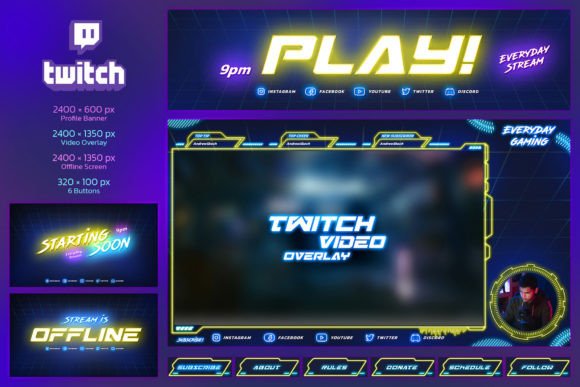
Many streamers, especially those just starting out, underestimate the importance of visual consistency. A common mistake is using a webcam overlay from one source, buttons from another, and an offline screen that looks completely different. This visual dissonance can make your channel feel amateurish and confuse new viewers about your brand. The Twitch Neon Gaming Kit solves this by providing a unified design language across all elements—from the main 2400 x 1350 px Gaming Overlay to the Profile Banner and Buttons. Everything shares the same bright neon text and aesthetic, creating an instantly recognizable and professional channel identity.
Overlooking the Importance of Usability vs. Pure Flash
A shining neon design is eye-catching, but if it obstructs gameplay or chat, it defeats its purpose. Some creators get seduced by overly flashy graphics that cover crucial game UI elements or make the chat hard to read. The Twitch Neon Gaming Kit is designed with practicality in mind. It features a special, clearly designated place for chat and a round frame for webcam video, ensuring these core interactive areas remain functional and legible. The neon elements accent the stream without dominating it. Before applying any overlay, always preview it with your typical game screen to ensure critical information isn’t hidden.
The Flexibility of Fully Editable Templates: A Crucial Advantage
Another frequent oversight is purchasing static, non-editable graphics. You might find a kit with the perfect color, but the text says “Pro Player” when you’re a variety streamer. The Twitch Neon Gaming Kit comes as fully editable Photoshop (PSD) templates. This means every piece of text, every indicator bar, and every social media icon placeholder can be customized. You get 5 PSD files covering all the components, allowing you to tailor the kit to your specific channel name, style, and information. This flexibility is vital for long-term use as your channel evolves. Always check if a graphic kit is editable before purchasing; it’s a detail that significantly impacts its value and longevity.
Technical Specifications and Getting Them Right
Misunderstanding the required dimensions for Twitch assets can lead to blurry or incorrectly sized graphics. Using a 1920x1080 overlay on a 2400x1350 stream setup will result in scaling and quality loss. This kit provides assets in the correct, high-resolution dimensions Twitch recommends: the main overlay and webcam overlay at 2400 x 1350 px, the two offline screens at 2400 x 600 px, and the profile banner at 320 x 100 px. Having the right size from the start ensures pixel-perfect sharpness. When using the provided Photoshop templates, make sure your project canvas is set to these exact dimensions to maintain quality when you export your final images.
Integrating Social Media and Channel Metrics Effectively
Promoting your other platforms is key for growth, but doing it awkwardly can feel intrusive. Simply pasting icon links randomly on your overlay looks messy. The Twitch Neon Gaming Kit includes designed placements for social media icons and indicator bars. These are integrated into the neon theme, offering a sleek and organized way to display your Twitter, YouTube, or Discord links, as well as visual metrics. This encourages viewers to connect elsewhere without breaking the visual flow of your stream. Utilize these dedicated spots—they are part of a cohesive layout plan that enhances communication rather than interrupting it.
A practical step before you finalize your setup is to gather all your channel information. Have your social media handles, your exact channel name, and any specific metric names (like “Sub Goal” or “Follower Count”) ready. When you open the Photoshop templates, you can efficiently edit all the text and placeholder elements in one session, ensuring everything is consistent and error-free. The included PDF file with font links and instructions will guide you through this process, helping you avoid the frustration of missing fonts or unclear steps.
From Download to Broadcast: Avoiding the Last-Minute Rush
Even with a ready-to-use kit, some streamers apply their new graphics hastily right before a live session, leading to configuration errors or layout issues on stream. The Twitch Neon Gaming Kit is indeed “Ready to Use for Twitch,” but you should treat it as a project. Dedicate time to edit the templates, export all the PNG or JPG files, and then test them in your broadcasting software (like OBS or Streamlabs) on a non-live scene. Check the alignment of the webcam circle, the transparency of overlay sections, and the readability of all text. This dry-run prevents live technical headaches and allows you to fine-tune the positioning for a perfect on-air look.
What you receive—the 5 PSD files, the help documentation—is a toolkit for professional presentation. Its value lies not just in the bright and shining neon design itself, but in the structured, complete approach it provides. By using a unified kit like the Twitch Neon Gaming Kit, you avoid the common mistakes of inconsistent branding, obstructive layouts, and inflexible graphics. You invest in a system that grows with your channel, saves you time searching for disparate elements, and ultimately presents a polished, engaging visual identity to your audience. The result is a stream that looks confident and intentional, letting your content shine in the best possible environment.